Install the packages.
The core works anywhere Effect does. The Foldkit adapter adds the browser pieces: the renderers (WebGL, or WebGPU with webgpuRendererFactory), the animation-frame loop and the scene element.
npm install @opsydyn/effect-three @opsydyn/effect-three-foldkit three effect foldkit
# when a scene needs physics or labels
npm install @opsydyn/effect-three-rapier @opsydyn/effect-three-troika
Add @opsydyn/effect-three-rapier for physics and @opsydyn/effect-three-troika for labels when a scene needs them. The four packages are released together at one version, and the adapters take the core as a peer at exactly that version, so install matching versions. They are 0.x: the public surface is what the API reports in each package's etc/ record, and a change that breaks it bumps the minor version.
Describe a scene.
A scene is plain data: a camera, shared resources and keyed nodes. Constructors fill in defaults, so a description stays short.
const sceneFor = (model: Model) =>
  scene({
    children: [
      mesh({
        key: 'cube',
        geometry: box(),
        material: standard({ color: model.colour }),
        rotation: spin({ axis: 'y', radiansPerSecond: 1 }),
        interactive: true,
      }),
    ],
  });
Rotation belongs either to the Model (fixed) or to a behaviour (spin), never both. Behaviours are pure functions of scene time, so frames are deterministic.
Meshes are built from box, sphere, plane, cylinder, cone, capsule, torus, ring, circle or text, with Drei's roundedBox and backdrop for product shots; line draws Drei's fat lines, pixels or scene units wide and dashed if you like, through points of your own or along a curve (catmullRomPoints, cubicBezierPoints, quadraticBezierPoints), and outlines a mesh's edges with edges: edges(); points, sparkles and stars are Drei's, seeded so they are the same every time, and trail() leaves a ribbon behind anything that moves; instances draws thousands of copies of one in a single call. A group with detail: detailed({ distances: [0, 10, 20] }) shows one child at a time by the camera's distance, as Drei's Detailed.
Render it with Foldkit.
Create one environment for the application, then render scenes from your view. Pointer interaction comes back as your own typed Messages: clicks, double-clicks, context menus, hover and movement, the wheel, and misses for clearing a selection. Only the handlers you pass are bound.
// entry.ts: once per application
import * as EffectThreeFoldkit from '@opsydyn/effect-three-foldkit';

export const environment = EffectThreeFoldkit.makeEnvironment(window);
export const sceneMount = EffectThreeFoldkit.makeSceneMount(environment);
// view.ts
EffectThreeFoldkit.view(
{
scene: sceneFor(model),
mount: sceneMount,
className: 'stage', // the element needs a size
onLifecycle: (lifecycle) => Message.ReceivedSceneLifecycle({ lifecycle }),
onClick: ({ key }) => Message.ClickedCube({ key }),
},
h,
);Unmounting the element releases its renderer, WebGL context, GPU resources, listeners and frame subscription. While Foldkit DevTools time-travels, the scene shows the historical state and ignores pointer input.
Try the playgroundKeys keep objects alive.
Keys are unique across the whole scene. A node keeps its Three.js object while its key and kind stay the same, including when it moves to another group. A structurally equal scene costs no host changes at all, which matters because Foldkit sends a fresh scene on every render.
Updating 1,000 meshes takes under 100 µs, whether nothing changed or one property did; then exactly one operation is applied.
Share what the GPU holds.
Declare a geometry or material once in resources, then refer to it by id. Shared resources are reference-counted across every scene on the page and disposed when their last user goes. Owned resources live and die with their mesh.
What the application owns, it lends: loaded models, textures and geometries go to the store under an id, scenes show them wherever a description names that id (even before it is lent), and nothing the application lends is ever disposed by the scene.
// Application-owned assets, shown but never disposed by the scene.
store.lend('car', gltf.scene);            // borrowed({ key: 'car', id: 'car' })
store.lendTexture('bricks', texture);     // standard({ map: 'bricks' })
store.lendGeometry('terrain', geometry); // mesh({ geometry: lentGeometry('terrain') })Animate without update.
Behaviours run in the frame loop, outside Foldkit's update, so a spinning scene never causes a Model update. Scenes pause their frames when off screen.
Transitions ease position and scale to whatever the Model says next. A new target mid-flight starts from the pose on screen, and a node moving to another group keeps its place in the world while it travels.
const cubeNode = (model: Model, cube: Cube, index: number) =>
  mesh({
    key: cube.key,
    position: [index * 1.1, 0, 0], // the Model owns the target
    scale: hovered(model, cube) ? [1.12, 1.12, 1.12] : [1, 1, 1],
    transition: ease({ seconds: 0.35 }), // the scene shows the journey
    geometry: sharedGeometry('cube'),
    material: sharedMaterial(cube.paint),
  });
rotation: billboard() keeps a node facing the camera, as Drei's Billboard, and a camera's shake: cameraShake({ decay: true }) shakes it once, as Drei's CameraShake: seeded noise, so the same moment shakes the same way.
Under prefers-reduced-motion, behaviours freeze, shakes hold still and transitions land at once while frames keep rendering.
Keep the camera in the Model.
With scene({ gestures: 'scene' }) the scene claims drags, the wheel and pinches, and reports each as a Gesture Message. orbit(model.camera, gesture) returns the next camera, as three.js's OrbitControls would move it, zooming toward the pointer if you ask. orbitKey handles arrow keys, and fitCamera frames a box the scene measured for you, as Drei's Bounds does.
A camera's damping eases the rendered camera to the Model's, views included. autoRotate turns it round its target by itself until someone touches it; before that gesture, an AutoRotated Message says where it got to, so the Model keeps it and the orbit carries on from there.
// The camera turns by itself until a gesture; keep where it got to first.
camera: perspectiveCamera({ position: [3, 4, 12], damping: 0.08, autoRotate: 0.25 }),

AutoRotated: ({ turned }) => ({
  model: { ...model, camera: autoRotated(model.camera, turned) },
}),
MadeGesture: ({ gesture }) => ({
  model: { ...model, camera: orbit(model.camera, gesture) },
}),
Objects move the same way. A transform gizmo is three's TransformControls as data: gizmoNodes draws its arrows, planes and rings from the Model, and pressGizmo and dragGizmo turn the press and drag rays into the next placement, as three's controls would, snaps and local axes included. The Foldkit adapter's TransformGizmo wraps it as a submodel that reports Moved and Finished, so the page keeps every placement and undo is a list. Box select is three's SelectionBox the same way: boxSelect returns the keys inside a box on the canvas, and the adapter's BoxSelect draws it from shift-drags, ending on the scene's GestureEnd. The axes in the corner are Drei's GizmoHelper: viewportGizmoNodes in the scene's hud, which draws nodes over everything with a camera of its own, and cameraAlong turns the camera to look from the axis pressed. Drei's PivotControls are there too, every handle at once: pivotNodes, pressPivot and dragPivot, and the adapter's PivotControls. A measuring tape is built the same way: placeTapeEnd and pointTape return the next tape, and the adapter's MeasuringTape labels its length.
Because a scene is data with a schema, the tools an editor needs come from it. SceneFile.save and SceneFile.read write and read scenes as JSON in a versioned envelope. History keeps every Model value as a tree, so undoing and then changing something starts a branch instead of losing what you undid. sceneChanges says what changed between two scenes, line by line, for review. Inspector.fields reads any value's fields from its schema, and Inspector.edit checks each change with that schema, so the adapter's inspectorView is a form that can never put an invalid value in your Model.
Describe bodies; let Rapier move them.
Give a mesh, group, loaded model or instances node a body() under scene({ physics: physics() }), and pass loadRapier() from @opsydyn/effect-three-rapier to the environment. Colliders come from geometry. Kicks are impulses with an id, applied once. Joints (fixed, spherical, revolute, prismatic, rope, spring, with motors) are data in physics({ joints }). Give a body colliders of its own when its geometry is the wrong shape. Collisions and contact forces return as Messages naming the node, the instance when there is one, and the collider's name as its part; physics({ debug: true }) draws every collider.
Collision groups (interactionGroups) decide which bodies meet, sensors report bodies entering and leaving without stopping them, and contactForces sets the threshold above which a body reports how hard it was pushed.
physics: physics({
  joints: [
    joint({
      key: 'wheel:hinge',
      a: 'axle',
      b: 'wheel',
      // The motor's speed is a number in the Model.
      kind: revoluteJoint({ axis: [0, 0, 1], motor: velocityMotor(model.wheelSpeed, 40) }),
    }),
  ],
}),

// Only teal marbles (group 2) meet the grate; gold ones fall through it.
body({ type: 'fixed', collisionGroups: interactionGroups(3, 2) }),

// Named sensor colliders: a collision says which bin a marble entered.
body({
  type: 'fixed',
  sensor: true,
  colliders: [cuboidCollider({ name: 'gold-bin', halfExtents: [1.4, 0.5, 0.3] })],
}),

// The wheel reports pushes harder than 16 N as contact forces.
body({ mass: 3, contactForces: 16 }),Set text two ways.
text() is geometry from a typeface font, as Drei's Text3D: extruded or flat, with letter spacing, line height and alignment. label() is crisp distance-field text at any size, as Drei's Text, drawn by troika once you pass troikaLabels() from @opsydyn/effect-three-troika (or its /webgpu entry, which draws under WebGPU too). Labels wrap and take anchors and outlines; give them a TTF, OTF or WOFF font.
Colour runs (colorRanges), curves (curveRadius) and a scene material to light the glyphs are fields too. A label named in scene({ measure }) reports its laid-out size as LabelMeasured, so the Model can size what goes behind it.
label({
  key: 'code:text',
  text: code,
  font: '/fonts/inter.woff',
  fontSize: 0.18,
  colorRanges: [colorRange(0, 0xe6e3dc), colorRange(6, 0x5b9bff)],
  curveRadius: 0,
  material: model.lit ? standard({ roughness: 0.55 }) : null,
}),

// scene({ measure: ['code:text'] }) reports the laid-out size:
onLabelMeasured: (measured) => Message.MeasuredLabel({ measured }),Light and stage it.
environment(), sky() and contactShadows() are Drei's staging as scene fields, and shaderGrid() is its fading grid. stage() returns Drei's Stage lighting to spread into a scene. Centre content with centerOffset on a measured box, and load one of Drei's environment presets with environmentPresetUrl.
WebGL or WebGPU.
The default renderer is WebGL 2. webgpuRendererFactory uses three's WebGPURenderer: WebGPU where the browser has it, its WebGL 2 backend otherwise. Each renderer brings a render kit, so skies, shader grids, contact shadows and post-processing have WebGL and TSL versions, and the same scene draws on either.
import * as EffectThreeFoldkit from '@opsydyn/effect-three-foldkit';
// Draws labels with either renderer: node materials (TSL) under WebGPU.
import { troikaLabels } from '@opsydyn/effect-three-troika/webgpu';

// WebGPU where the browser has it, its WebGL 2 backend otherwise.
const environment = EffectThreeFoldkit.makeEnvironment(window, {
  renderer: EffectThreeFoldkit.webgpuRendererFactory, // one per canvas
  labels: troikaLabels(),
});
Labels draw under WebGPU too: take troikaLabels from @opsydyn/effect-three-troika/webgpu. troika still lays the text out and builds its glyphs, and a node material draws them, outlines, curves, colour ranges and lit materials included. Known limits: WebXR on WebGPURenderer is wired but untested, and the DOM overlay is checked only in the session request. Every example takes ?renderer=webgpu in its address.
Step into it.
A scene with xr({ origin, heading }) can be presented in WebXR. Enter and exit with environment.xr Effects from your Commands. Controllers and hands hover, click and drag along their rays. Thumbsticks and buttons arrive as Messages: locomote turns and steps the player by returning new xr settings for your Model. In AR, xr({ hitTest: true }) reports the real surfaces a select points at. xr({ glide }) moves the player with the sticks inside the session, and XrMoved says where they stopped.
Groups can ride tracked things with follow: the head, a hand joint, a controller, an anchor the scene placed with xr({ anchors }), or a plane or mesh the session detected (XrPlanes and XrMeshes Messages, with planes: true and meshes: true). A detected mesh's geometry is lent to the scene, so xrMesh(id) draws it with any material. xr({ domOverlay: true }) keeps HTML overlays in AR.
scene({
  xr: xr({ glide: glide(), hitTest: true, planes: true, meshes: true,
    anchors: plants.map((plant) => xrAnchor({ id: plant.id, position: plant.at })) }),
  children: [
    // Rides the left hand, without a Message per frame.
    group({ key: 'tips', follow: jointSpace('left', 'wrist'), children: [tips] }),
    // Stays where it was put as the session learns the room.
    ...plants.map((plant) =>
      group({ key: plant.id, follow: anchorSpace(plant.id), children: [pot] })),
    // A detected mesh, drawn with the geometry the session lends.
    ...model.meshes.map(({ id }) =>
      group({ key: id, follow: meshSpace(id),
        children: [mesh({ key: `${id}:shape`, geometry: xrMesh(id), material })] })),
  ],
});Use the runtime directly.
Outside Foldkit, start a scene inside a Scope. Startup is atomic: if the description is invalid, the renderer can't be created, or startup is interrupted, nothing is left behind.
import { Effect, Layer } from 'effect';
import { FrameSource, ResourceRegistry, SceneRuntime } from '@opsydyn/effect-three';

const program = Effect.gen(function* () {
  const handle = yield* SceneRuntime.make({ scene, renderer, viewport });
  const ops = yield* handle.update(nextScene); // [] when nothing changed
  handle.pointer({ _tag: 'PointerDown', x: 0, y: 0, button: 0 });
}).pipe(Effect.scoped); // closing the scope releases everything

const environment = Layer.mergeAll(ResourceRegistry.layer, FrameSource.layer(scheduler));
Test it headless.
A recording renderer, a manual frame scheduler and Effect's TestClock make scene tests deterministic, with no browser and no GPU.
const frames = createManualFrames();
const renderers = recordingRendererFactory();

const handle = yield* SceneRuntime.make({ scene, renderer: renderers, viewport });
yield* advanceFrames(frames, 500, 20); // TestClock.adjust + frames.step()

expect(renderers.created()[0]?.renders()).toBe(500);
expect(handle.graph.object('cube')?.rotation.y).toBeCloseTo(10);
expect(yield* handle.drainEvents).toEqual([]); // animation never reaches update
Preview it without a browser.
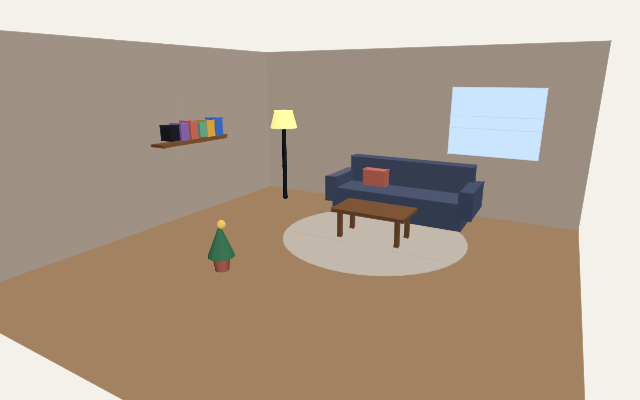
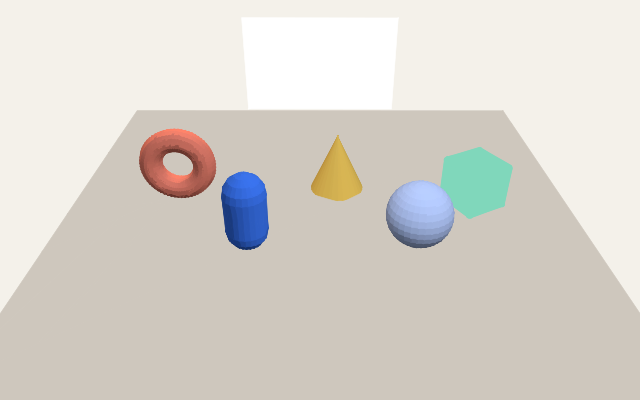
previewSvg draws a description as SVG anywhere JavaScript runs: the scene graph is built as for the renderer, projected with three's Projector, lit by three's diffuse term and painted far to near in the order a binary space partition gives, so a floor never covers what stands on it. It is a flat-shaded preview: no textures, shadows or labels. These two are the room and studio examples' first scenes, drawn when this site was built.
// In a build, a server or a test: no browser, no GPU.
const result = previewSvg(sceneFor(model), { width: 640, height: 400, at: 0 });
if (result._tag === 'Preview') await Bun.write('preview.svg', result.svg);

// Or from a saved scene file:
// bun run scene:preview scene.json preview.svg --background f4f1ea
Let an agent arrange it.
Every change to a scene is a Schema-typed Message, so an assistant can make changes through the same door a click does. Export devTools with your Message schema, add @foldkit/devtools-mcp to your agent, and in development it can read the Model, list what happened, and dispatch Messages. Each one is decoded first: a malformed one is refused, and a valid one goes through update like any other, so it shows in DevTools history, where time travel can step back past it. With several pages open, name the page with runtime_id; in a monorepo, point FOLDKIT_PROJECT_ROOT at the app.
Give an assistant words rather than numbers. describeScene and formatSummary say what a scene holds in a few lines; shotCamera frames things from a named angle and moodStaging lights a scene by mood. The editor example offers them as Messages, PlacedThing, FramedShot and ChoseMood, that an agent dispatches like any click.
Peers that run the same update stay in the same state if they apply the same inputs in the same order. Lockstep is that protocol as data: one packet per peer per turn, a turn applied when all are in, newcomers admitted in a turn and welcomed with the state. Bring any transport; the editor example uses a BroadcastChannel, so two tabs edit one scene with one shared history, or a WebSocket relay that hands every message on, so two machines do.
Physics shares the same way once the Model keeps the clock. physics({ until }) steps the world to a step and stops there, reporting it with a checksum of every body; whatever the description changes while it waits lands at that step on every peer, however their frames fell. A Timeline holds inputs stamped with their step, and Rapier's deterministic build makes the result the same on every machine. The tabletop example throws balls at one tower from every window.
// main.ts: hand DevTools the Message schema, and in development an agent can send
// Messages through the Foldkit DevTools MCP server, decoded like any other.
export const devTools = { Message, excludeFromHistory: ['MadeGesture'] };

// message.ts: what an agent (or a script, or a test) sends to arrange the room.
PlacedPlant: { at: Vec3, kind: PlantKind },  // PlantKind: 'fern' | 'cactus' | 'tulip'

// An agent's tool call; a kind the schema does not know is rejected before update.
foldkit_dispatch_messages({ messages: [
  { _tag: 'ClickedClear' },
  { _tag: 'PlacedPlant', at: [1.2, 0, 0.4], kind: 'tulip' },
] })How it fits together.
Kernel
Plain TypeScript: descriptions, keyed diff, applier, resources and behaviours. It never imports Effect.
effect-three/kernelRuntime
Effect services, scopes and typed errors around the kernel.
effect-threeFoldkit adapter
The scene element, WebGL and WebGPU renderers, frame loop, assets, XR sessions and DOM bridge.
effect-three-foldkitRapier physics
The physics engine: bodies, colliders and joints described in scenes, simulated by Rapier.
effect-three-rapierTroika labels
The label engine: distance-field text drawn by troika, with colour runs, curves, materials and measured layouts.
effect-three-troikaDecisions
The plan, architecture decision records and benchmark results.
docs/effect-three